


You can now build an AI finance app yourself, with end-to-end workflows automated in about an hour. Sign up at app.lumerahq.com/signup and work with the Lumera coding agent to bring your first AI automation to life.
In my last two posts, I wrote about how finance teams are leaning into coding agents to automate their workflows. Today, I want to give you a blueprint for how to start building.
The apps you'll build in Lumera mostly share the same structure. Understanding it up front will make you a much better user of the coding agent.Across finance workflows, the same three zones show up: inputs, business logic, outputs. You’ll see them in accruals, bank recs, revenue recognition, AP coding, close management, and most other finance processes.
The important part is this: in Lumera, you are not wiring all of this together yourself. You describe the workflow, the context, the review requirements, and the outputs you want. The coding agent figures out how to implement that across deterministic code, AI agents, human review, and the underlying platform components. It scaffolds the system for you.
The blueprint: inputs, business logic, outputs
Every finance workflow can be abstracted into three zones.

Inputs and context. The data and business context the workflow depends on. Your ERP connection, bank feed, vendor inbox, chart of accounts, approval policies, accrual thresholds, prior-period patterns, supporting documents, and internal guidance. Some of this is live data flowing in from systems. Some of it is institutional knowledge your team wants applied consistently every time.
Business logic. The layer that turns inputs into work. It’s where the system decides what rules to apply, where judgment is needed, what should happen automatically, and what should be routed to review.
Outputs. Where the work ships. Draft journal entries, review screens for your team, posted entries in NetSuite, outbound emails, dashboards, and the audit trail that records what happened at each step.
If you understand these three zones, you understand the basic shape of an AI finance app.
The logic layer: agents, code, and humans
The most important zone is the middle one. That’s where the app actually does the work.
A good finance app doesn’t rely on one technique. It combines three.
AI agents handle judgment. Anywhere a strong accountant would need to read, interpret, compare, or decide, an agent can help. Reading a vendor email to determine whether services were delivered. Deciding whether an accrual is needed. Estimating an amount from incomplete support. Researching technical accounting guidance and drafting a memo for non-standard accounting treatment.
Deterministic code handles rules. Anywhere the answer is fully determined by the inputs, code should do the work. Pulling all open POs as of month-end. Applying a GL mapping. Joining current activity to prior-period accruals. Calculating schedules. Summing balances. If the logic is clearly specifiable, it belongs in code.
Humans handle exceptions and material decisions. Humans should review the cases where the stakes are high or the answer is unclear. Items over a materiality threshold. Estimates without invoices. Unusual activity. New vendors without prior patterns. Anything the system flags as low confidence.
That’s the core design pattern:
If you can state the rule clearly, it should be code.
If a strong accountant would pause and think, it should involve an AI agent.
If the cost of being wrong is material or the answer is genuinely ambiguous, it should route to a human.
In many systems, the builder has to decide this split manually and then stitch everything together. In Lumera, the coding agent makes these implementation decisions for you based on the workflow you describe. It determines where deterministic logic is appropriate, where agentic reasoning is needed, where human review should sit, and which platform components should be created to support that flow.
It’s still useful to understand the pattern. But the reason to understand it is not so you can wire the system by hand. It’s so you can give better instructions, review the design intelligently, and refine the result.
How this gets built in Lumera
The easiest way to think about building in Lumera isn’t as assembling software components one by one. It’s as working with a coding agent that turns workflow requirements into a working finance app.
You are primarily describing what the workflow should do, what context it should use, what should be reviewed, and what should happen at the end. The coding agent figures out how to implement that inside Lumera.
A practical build process looks like this.
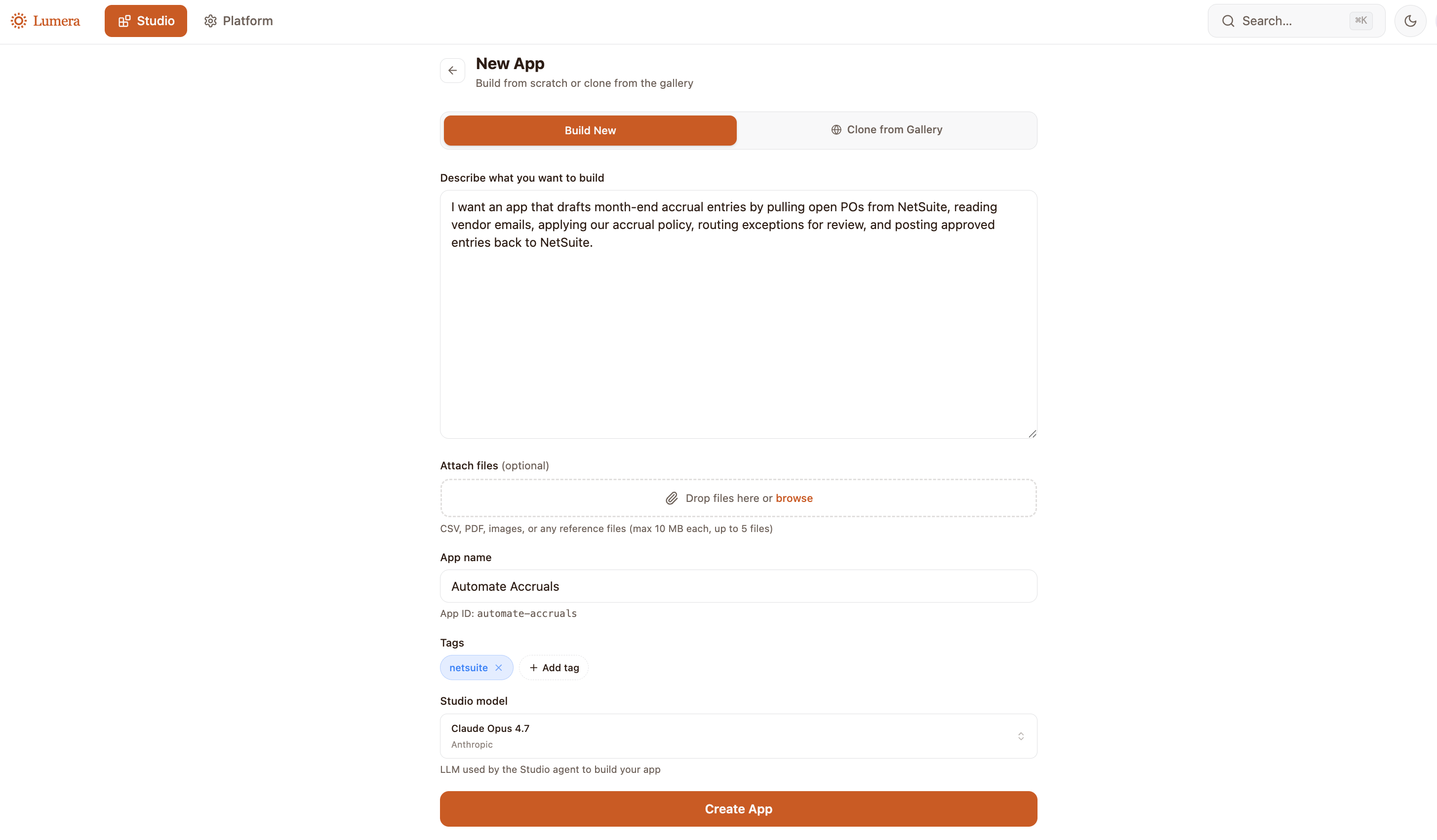
1. Describe the workflow.
Start by telling the coding agent what you want the app to do. For example:
I want an app that drafts month-end accrual entries by pulling open POs from NetSuite, reading vendor emails, applying our accrual policy, routing exceptions for review, and posting approved entries back to NetSuite.
That gives the coding agent the core workflow: the inputs, the decision points, the review layer, and the outputs. You don’t need to start by deciding which functions should be deterministic code versus agentic logic, or which platform components need to be created. The coding agent works that out for you.
2. Provide the business context.
Next, give the workflow the context it needs to behave correctly. That can include your chart of accounts, vendor-to-GL mappings, accrual policies, materiality thresholds, review rules, memo conventions, prior examples, and edge cases your team already knows how to handle.
This is one of the most important parts of the build. The coding agent can infer a lot from the workflow description, but the quality of the app still depends heavily on the quality of the business context behind it. The better your policies, examples, and guidance, the better the resulting system will be.
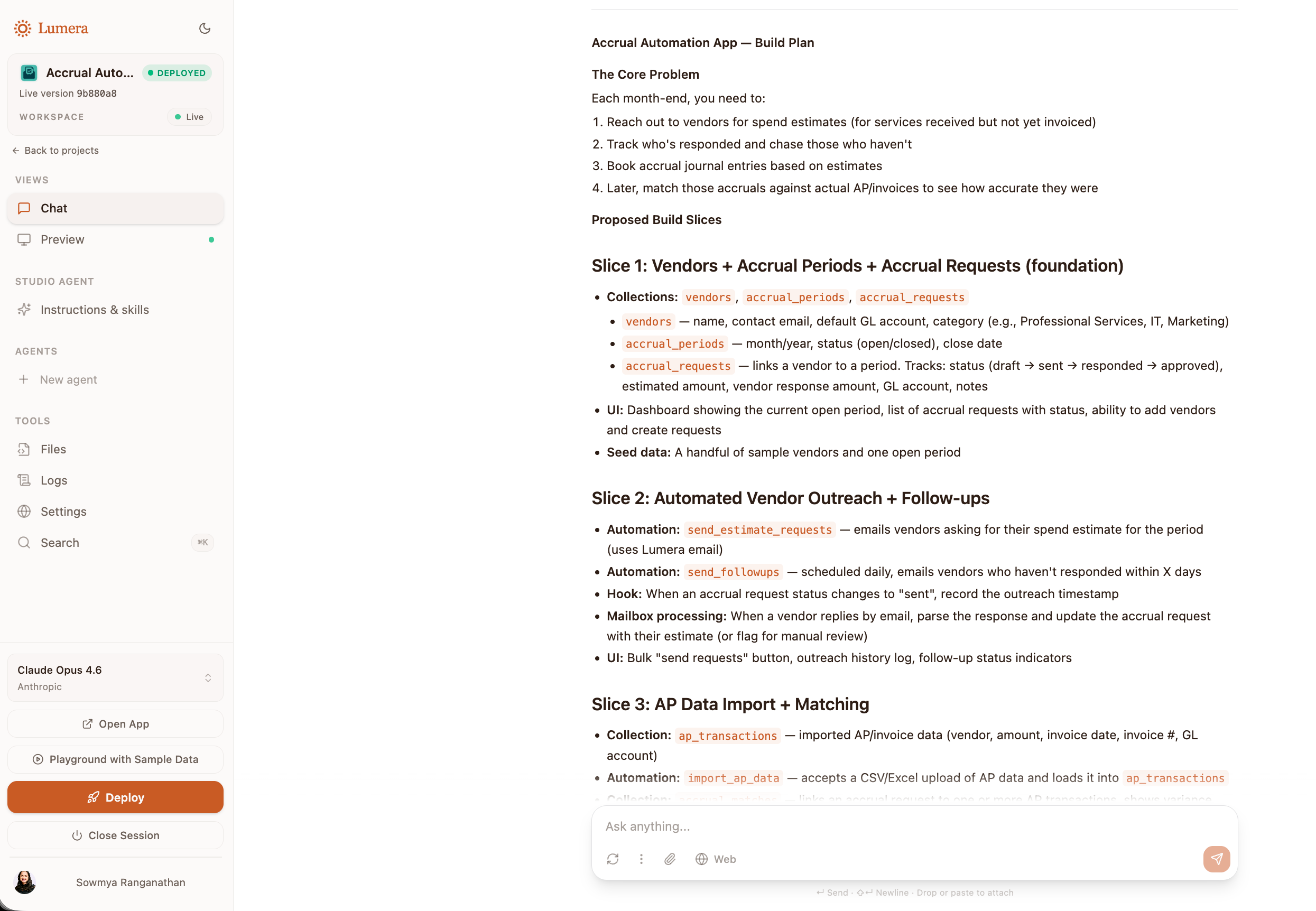
3. Let the coding agent scaffold the system.
Once it has the workflow and the context, the coding agent scaffolds the implementation. It determines how to split the workflow across deterministic code, AI agents, and human review. It sets up the underlying platform components: Collections for structured business context, Skills for reusable instructions, Hooks for routing logic, Integrations for system connectivity, Mailboxes for inbound and outbound communication, front-end surfaces for review and action.
This is one of the main advantages of building in Lumera. You aren’t stitching together infrastructure yourself. You’re specifying the workflow, and the coding agent generates the system around it.
4. Review and refine the first version.
Once the first version is scaffolded, you refine it. That usually means clarifying policies, improving examples, tightening thresholds, adjusting how aggressive the system should be about auto-drafting, or changing what should be routed to review. Sometimes it means correcting business context that was incomplete or ambiguous. Sometimes it means telling the coding agent a step should be more rules-based or more conservative.
This is where understanding the blueprint helps. Not because you need to wire the system yourself, but because it helps you judge whether the coding agent made the right design choices.
5. Test it on historical data.
Before running the app in a live close, test it on a prior period where you already know the right outcomes. This is the fastest way to validate whether the logic, context, review rules, and outputs are behaving correctly. In practice, most early improvements come from refining the instructions, policies, mappings, and examples rather than changing the architecture itself. A couple of passes on historical data will usually tell you whether the app is ready for production use.
What this looks like for accruals
Putting it all together, building an accrual app might look something like this.
You tell the coding agent you want an app that drafts accrual entries using open POs, prior-month accruals, vendor emails, and your accrual policy. You upload your chart of accounts, mapping tables, materiality thresholds, and a few examples of strong accrual entries from prior closes. You specify which cases should be reviewed before posting.
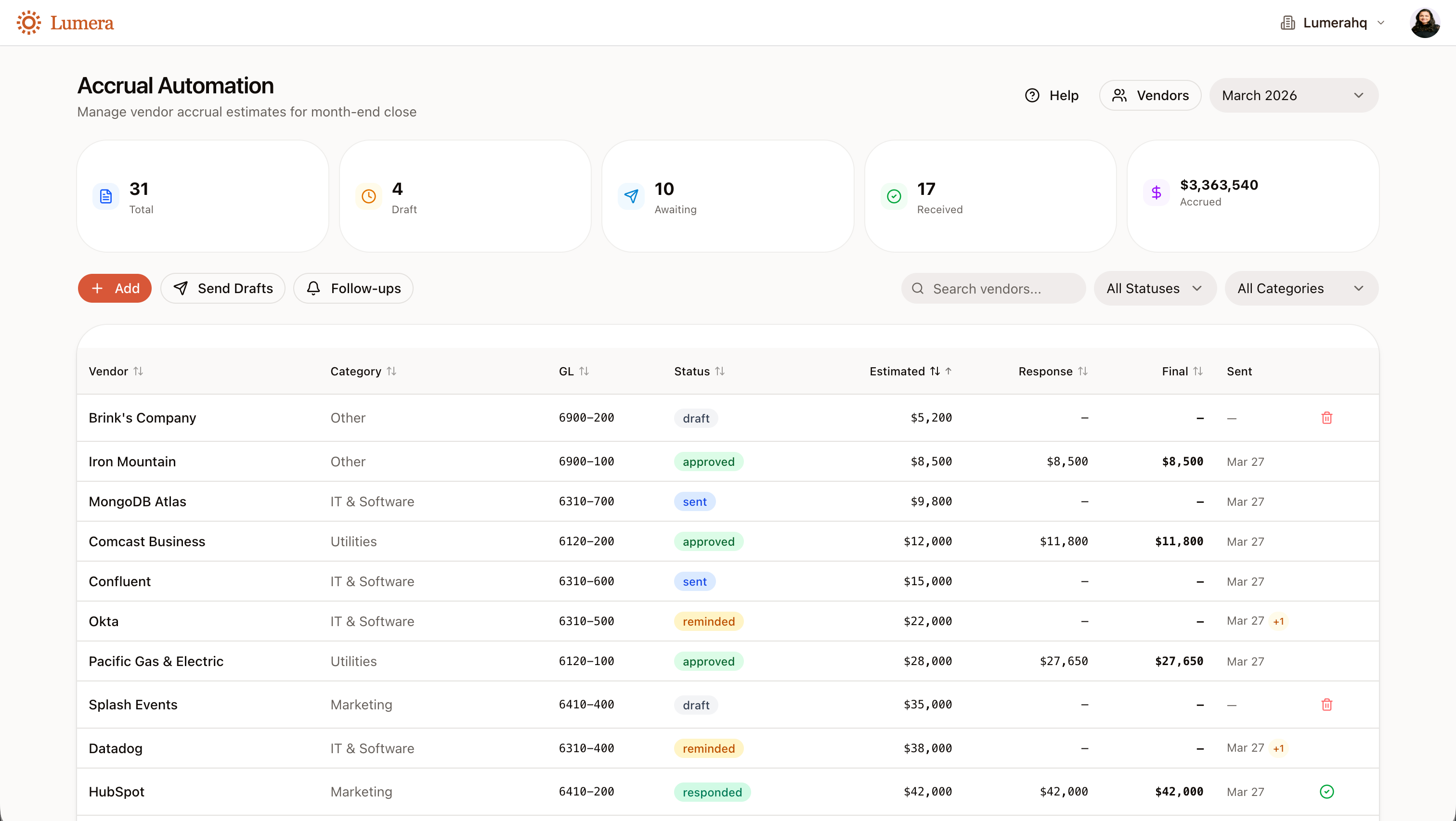
From there, the coding agent decides how to implement the workflow. It may use deterministic logic for recurring accruals with stable patterns. It may use an agent for variable or ambiguous cases. It may create review routing for estimated entries over a threshold or for vendors without prior history. It scaffolds the review screen and wires the approved output back to NetSuite.
You’re still in control of the workflow. But you aren’t hand-building the system step by step.
What good looks like
A good AI finance app isn’t just an assistant layered on top of data. It’s a real operating workflow.
It connects the right systems, applies the right mix of code and judgment, routes the right exceptions to a human, and sends the result where the work actually needs to go. Just as importantly, it does this in a way the team can understand, review, and trust.
That’s the blueprint behind these apps. And in Lumera, the job of the builder isn’t to wire that blueprint together manually. The job of the builder is to architect the solution, describe the workflow clearly, provide the right business context, and guide the coding agent toward the right implementation.
That’s what makes it possible to go from workflow idea to working app in an hour instead of a quarter.
Start building
Sign up at app.lumerahq.com/signup. Pick a workflow that runs every month, costs your team real time, and has a clear owner. Describe it to the coding agent. Upload the policies and examples that capture how your team actually does the work. Review what it scaffolds, refine it, and test it on last period’s data.
Your first version won’t be your best one. But you’ll go from “I’ve heard AI can do this” to “I have an app my team is using” in a single evening.
Join our community of finance builders at https://www.lumerahq.com/community to share what you build!
Sowmya is the CEO and co-founder of Lumera, AI infrastructure for finance teams. She was previously Controller at OpenAI and Rippling, and led Corporate Accounting at Square.