


If you missed the Lumera Live webinar last week, we talked about a question that is starting to show up everywhere: how do we actually optimize AI spend?
Experimentation is easy. Someone starts with ChatGPT or Claude. A team runs a hackathon. A prototype gets built in a day. That part is fun, and honestly, still pretty magical.
The harder part is what happens after the prototype works. What does it cost to run this in production? What happens when usage scales across a team or a company? And how do you know whether the return is worth it?
For this session, I focused mostly on the spend side. ROI matters too, of course. The return could be faster close cycles, better reporting, fewer manual errors, or more time back for the team. But before you can have a real ROI conversation, you need to understand what you are spending and why.
AI spend is not one number
This topic had been on my mind after reading a WSJ CFO Journal piece about finance leaders seeing AI spend creep up faster than expected. Ramp recently published an analysis that made the issue even more concrete. Their data is not comprehensive, since it is based on spend they see from their customers and much of it runs through corporate cards. But the sample size is large enough to be useful.
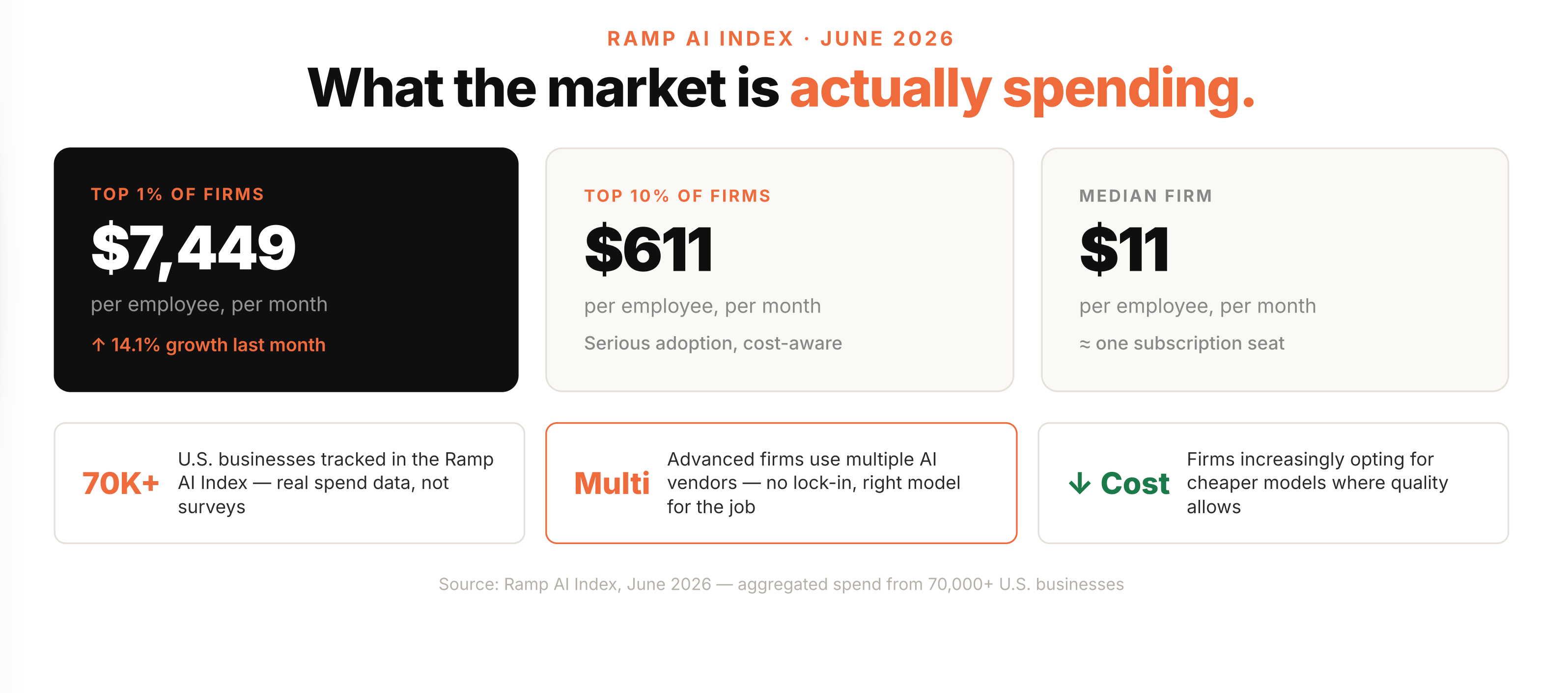
The top 1% of companies adopting AI are spending close to $7,500 per employee per month. That number jumped out at me. It is not payroll, and it is not benefits, but it is a level of tooling spend that we have not really seen before.
The top 10% are closer to $600 per employee per month, which feels much more in line with what we see from teams building with Lumera. The median company is closer to $11 per employee per month, which likely means a handful of people have access to team or enterprise subscriptions, not that AI is being used deeply across the company.
The interesting part is that the companies spending at the top are not just picking one vendor and calling it done. They are using multiple AI vendors and choosing the right model for the job.
That is where the finance discipline comes in.
Subscription pricing and API pricing behave very differently
There are two main ways companies pay for AI.
The first is the subscription model. Think ChatGPT Plus, Claude Pro, or an enterprise contract where employees get access to a chatbot. It is simple to budget. You know the monthly cost. You can decide who gets a seat.
The tradeoff is lock-in. Once you are in a wall-to-wall deployment with one provider, you are probably not also paying for the same kind of subscription with every other provider. That can be frustrating because the best model changes every few months. What looked like the clear winner last quarter might not be the right answer today.
The other issue is rate limits. If you are a power user, you hit them. I hit them. It is annoying when you are in the flow and suddenly the tool tells you to come back in five hours. It is almost a built-in budget control, but not a very elegant one.
The second model is API pricing. This is usage-based, usually priced per token. You pay more when you use more tokens or more expensive models, and less when you use smaller models or process less data.
Most companies that are adopting AI at company scale are operating in the API model somewhere. It takes more setup, but you get much more granular visibility and control.
Tokens matter more than people think
A token is not exactly a word. It is more like a chunk of text or data, and different models tokenize differently.
When you give a model a prompt, that is input tokens. If you upload files, those are input tokens too. When the model thinks, writes code, calls tools, or produces an answer, that also uses tokens. If it gives you a long memo, an Excel output, or a detailed explanation, that output has a cost too.
This is why pricing can get confusing quickly. Two models might look similarly priced on paper, but if one tokenizer breaks your data into more tokens than another, your actual cost can be different.
I do not think finance teams need to nickel and dime every token. But you do need to understand the broad shape of the cost. The cheapest and most expensive models can be orders of magnitude apart. If you are using an expensive frontier model for every single task, the cost will show up eventually.
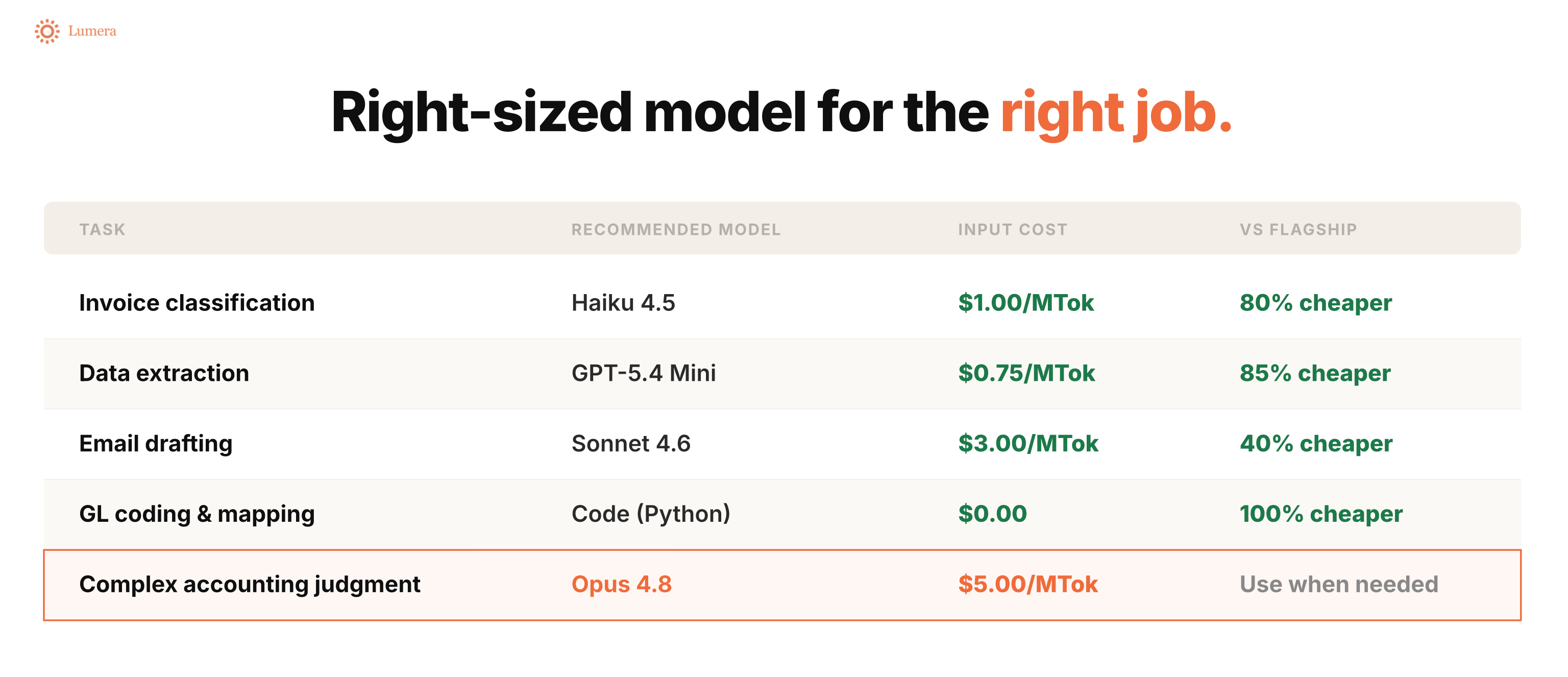
My view on this has changed over the last year. A year ago, I would often say, “Just use the best model.” If you are using it once to build something valuable, the model cost is usually not the thing to optimize.
That is still true for some use cases. If the work requires judgment, technical accounting reasoning, complex analysis, or good architecture, use the stronger model.
But if the task is simple, do not hire a PhD-level model for an intern-level job. Reading an email and classifying it as AP or AR does not need the most expensive model available.
The bigger idea: write code once, then run it again
One of the biggest ways to control AI spend is to stop asking the LLM to redo the same work every time.
LLMs are very good at writing code. But it is a waste of money to have the model write the same code over and over again every time you need the same output.
The pattern we use in Lumera is:
Use the LLM to help build the app or automation.
Save the generated code in a secure, company-specific environment.
Run that code again whenever the process repeats.
Only go back to the LLM when the code or workflow needs to change.
When you build, you incur LLM cost. When you run the saved code, you are paying for regular compute, not another round of LLM reasoning.
That makes the economics much better, especially for recurring finance workflows.
But cost is not even my favorite reason for this pattern.
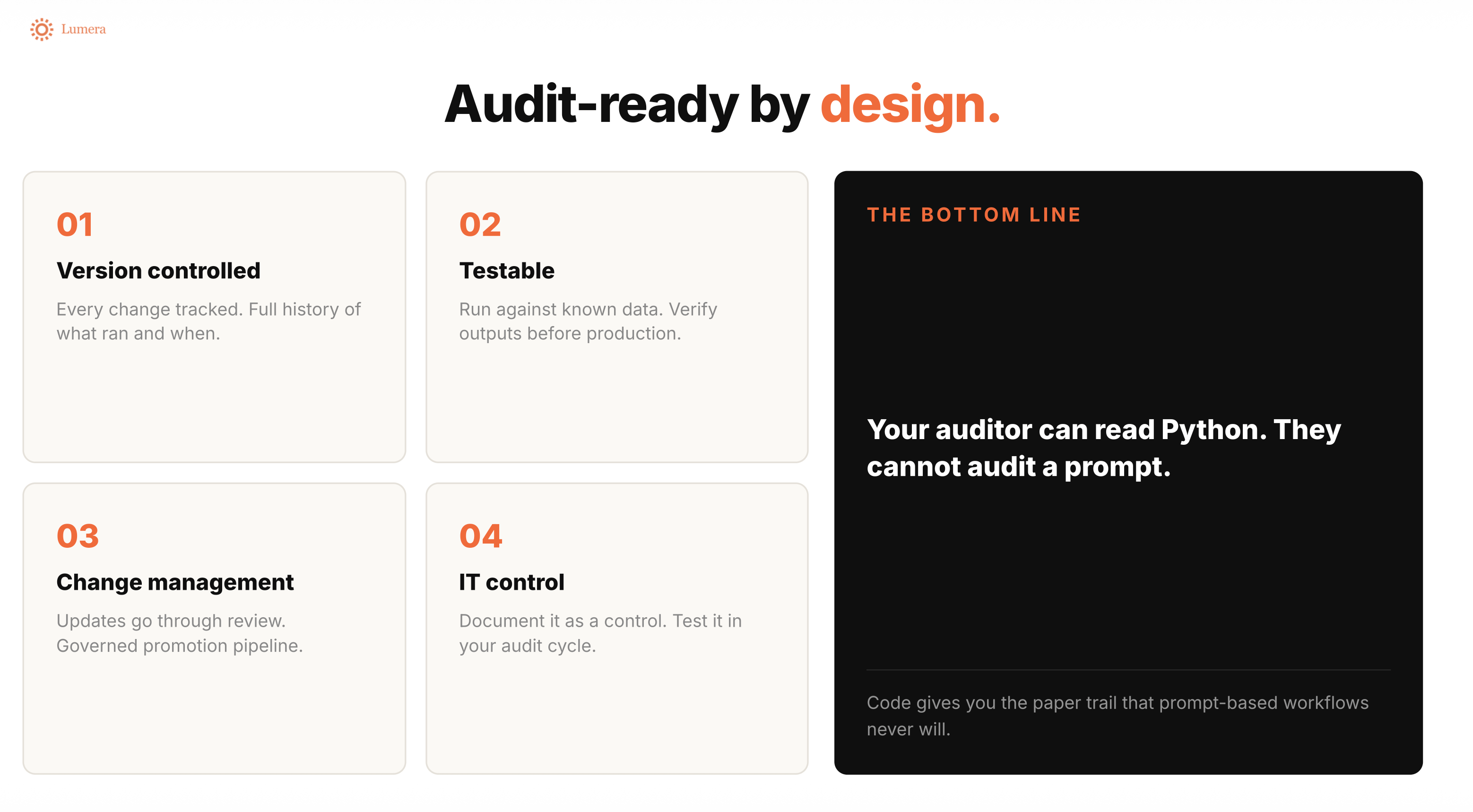
If you upload a file to a chatbot and it generates a journal entry, how do you give comfort to an auditor? The output might not be the same the next time. The steps are hard to inspect. The whole thing is a black box.
With code, you have version control. You can see what changed, who changed it, what version is deployed, and what version was used for a given period. You can test it, complete UAT, lock the workflow, document the control, and rerun it.
That is a much better pattern for finance.
When we were using this approach at OpenAI, we gave our auditors the Python script and said: ChatGPT wrote this, but this is the script we use every period. They could hand it to their IT audit team and review it like code. That gave everyone much more comfort than saying, “We asked a chatbot.”
What we showed in Lumera
In the demo, I walked through a NetSuite monthly financial reporting app in Lumera.
The app connects to NetSuite, pulls actuals and budget data, builds a BVA view, and writes flux explanations with links back to supporting transactions. Under the hood, the data pull is a saved Python automation using the NetSuite API and SuiteQL.
The important part: syncing the NetSuite data does not require an LLM call each time. The LLM helped write the script. After that, the script runs in a sandboxed cloud environment and fetches the data directly.
The flux commentary is different. That part does use an LLM, because the model needs to look at the numbers, reason through the variance, and draft an explanation grounded in the data.
So even inside one app, different parts of the workflow use different levels of AI.
That is the point. You do not want one giant expensive model doing everything. You want the right model doing the right job.
For building the app, I still recommend strong coding models. That is the hardest part. You want good architecture and something durable enough to put into production.
For sub-agents or recurring task-specific agents, start smaller. Give the agent only the skills and context it needs. If a financial commentary agent only needs to understand materiality and how to write a flux, do not give it every possible company skill. All of that extra context becomes input tokens, and input tokens cost money.
If the smaller model performs well, great. If quality is not good enough, first improve the prompt or the skill. Then upgrade the model if you need to.
You need visibility before you can optimize
We also looked at usage tracking in Lumera.
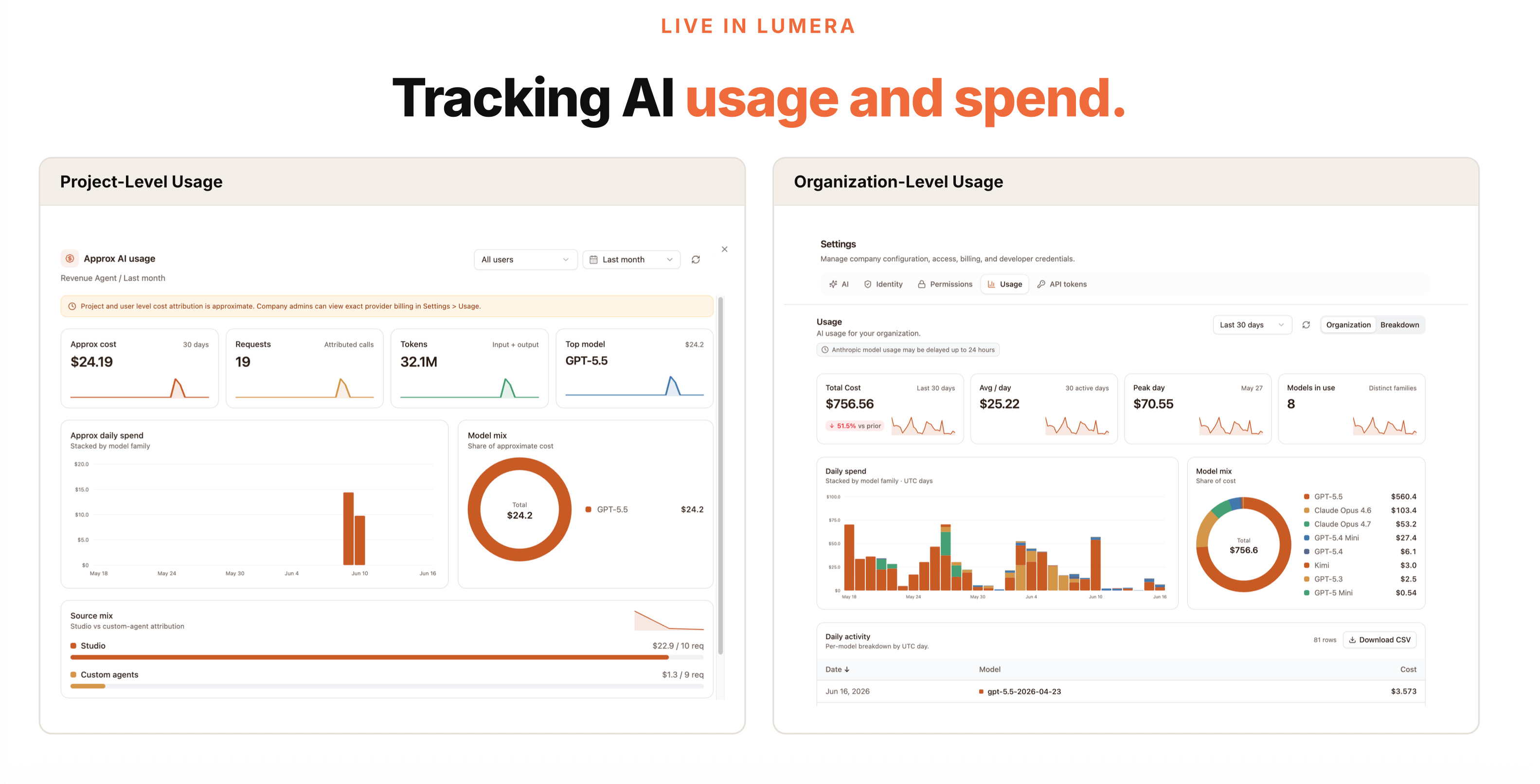
At the project level, you can see what an app cost to build and what it costs to run. In the NetSuite reporting app, most of the cost was in Studio, because building code is the expensive part. The recurring commentary calls were much smaller because they used a cheaper model and a narrower task.
At the company level, admins can slice usage by app, user, model, and time period. That matters because AI spend can otherwise creep in from everywhere: corporate cards, reimbursements, team subscriptions, API keys, and individual experiments that quietly become production workflows.
Finance teams should start by auditing current AI spend across all of those places. Set a materiality threshold if you need to, but do not assume the spend is only where the official contract is.
Then look at the return. I like internal AI shares channels, but the bar should be higher than “look at this cool demo.” Teams should be able to say what actually changed about how work gets done.
My practical takeaways
If you are trying to get a handle on AI spend, I would start here:
Audit current AI spend across subscriptions, cards, reimbursements, API usage, and team-level tools.
Separate experimentation cost from production cost.
Use strong coding models when you are building durable apps or automations.
Save generated code and rerun it instead of asking an LLM to recreate the same workflow every time.
Right-size models for recurring sub-tasks.
Track usage by app, user, model, and workflow.
Measure ROI in terms of real workflow change, not just demos.
AI is now a real budget line. Finance teams need the same muscle here that we bring to everything else: visibility, controls, and a clear answer to “what changed because of this spend?”
That is the work now.
Sowmya is the CEO and co-founder of Lumera, AI infrastructure for finance teams. She was previously Controller at OpenAI and Rippling, and led Corporate Accounting at Square.
Great article!