


When you work in Excel, you see every formula. You can trace precedents, review interim tabs, and catch formula errors before they ship in the board deck.
With code-generated workflows—whether you’re writing Python yourself or letting ChatGPT do it for you—most of that intermediate plumbing is hidden inside the script. While the latest crop of models have incredible coding abilities, it’s easy to miss an off-by-one date error or an unexpected NULL that silently snowballs into the wrong answer.
The quick fix
Always ask the model for a visual sanity check in the same prompt that builds your output file.
A chart (or even a nicely formatted table) makes it obvious in one glance when something looks off.
Let me show you an example. Imagine you want to write a Python script that generates a deferred revenue waterfall. The script reads an invoice file and builds a deferred-revenue waterfall in Excel. Here’s a sample prompt you could use for this:
You are a Python assistant for accountants.

I have a CSV with columns:
InvoiceID, CustomerID, InvoiceDate, RevenueType
(Software Subscription, Implementation, Support), Amount, TermMonths,
StartDate, EndDate.

Write fully commented Python (pandas + matplotlib) that:

1. Reads the CSV and expands each invoice into monthly revenue-recognition rows
   • Subscription & Support → straight-line over TermMonths starting StartDate
   • Implementation → 100 % recognized in StartDate month

2. Produces a summary table of revenue recognized by Month and RevenueType.

3. Builds a deferred-revenue waterfall per ASC 606:
   BegDeferred + Billings − Recognized = EndDeferred, by Month × RevenueType.

4. Exports the invoice data, recognition summary, and waterfall to an Excel workbook using xlsxwriter.
Let ChatGPT run with that prompt and you’ll get a script that makes the Excel file you need. But you still have to open the workbook and build your checks manually to convince yourself it worked.
Level-up: add visuals to the same script
Add this to the end of your prompt:
5. Create two visuals and save them as PNG *and* embed them in the workbook:
   • Stacked bar of monthly Revenue Recognized by type
   • Stacked bar (waterfall style) of Ending Deferred Revenue balances by type

6. Display (show) these visuals when the script finishes.
ChatGPT will regenerate the code, inserting matplotlib calls to create a visual chart.
Using the pictures for a “five-second audit”
I ran the script I got from ChatGPT on a real invoice file and got the chart below.
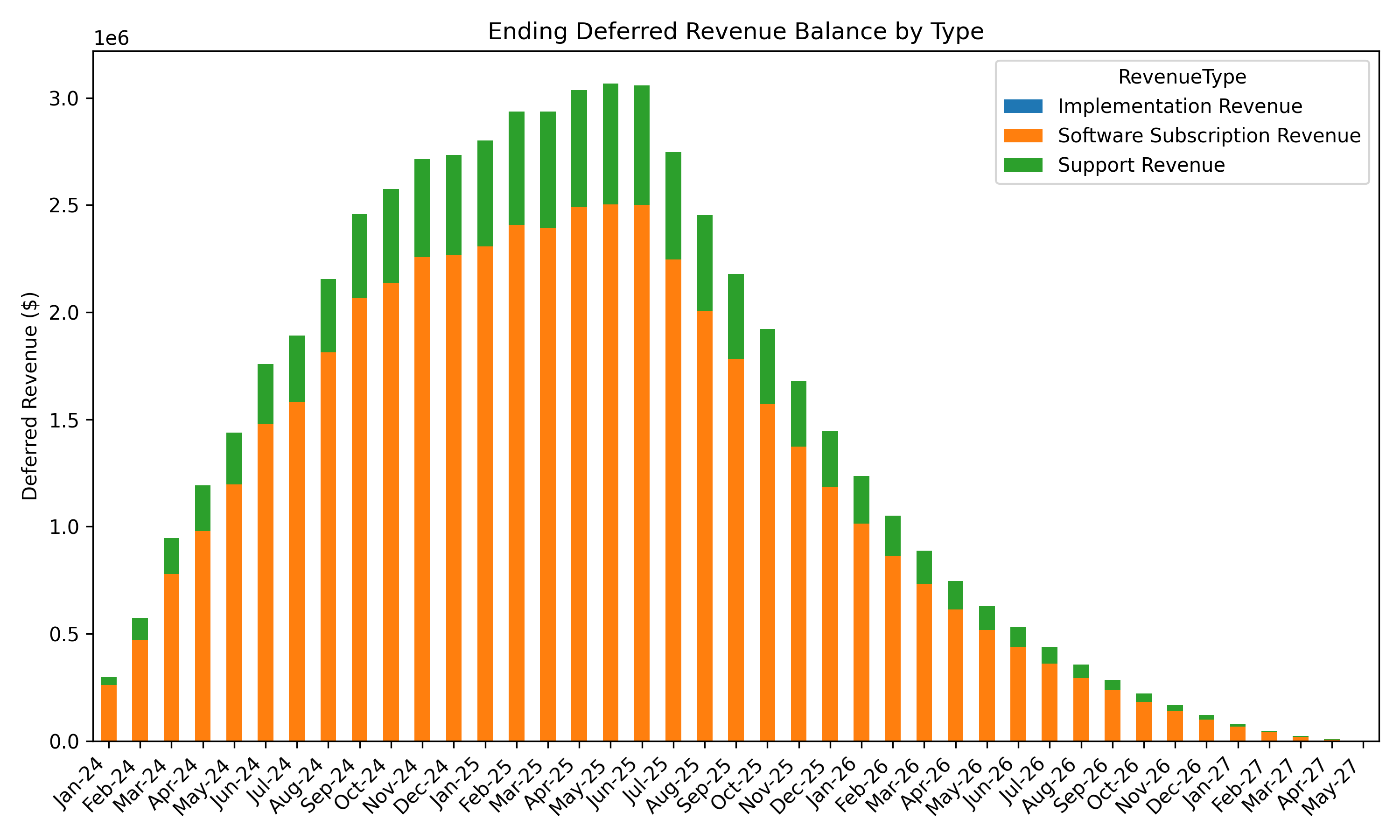
You see only two stacked bars—Subscription and Support—but no Implementation.
That’s a good thing! Implementation revenue is 100 % recognized in month 1, so there is no deferred balance left to plot.
With one glance you’ve confirmed your logic for pattern of recognition is sound. If Implementation had shown up in the waterfall, you’d know something was wrong before you even cracked open the workbook.
Similarly, you can quickly gut check seasonality and other trends you know exist in your data by looking at the output visually.
Tips for getting the most out of code-generated visuals
Ask early, ask often: add the visual requirement the first time you prompt so you debug as you build.
Start small: run the script on 5 invoices before you throw a larger billing dataset at it.
Automate basic reconciliations: add completeness and accuracy checks in a chart or table format to the prompt and ask for these checks to be documented in a summary tab in the output file.
Visuals aren’t just pretty. They create a rapid-feedback loop that lets you inspect the results of the script quickly as you iterate through it. The next time you ask ChatGPT to crank out a Python script, add “give me a chart” to your prompt.
If you are looking to put AI to work for you and your team, consider signing up for this AI Masterclass for Accounting. It is a two hour hands-on workshop with live demos of practical AI applications (ChatGPT and beyond). Click below for details.
great advice!
I really love this as a way to convert the probabilistic output of ChatGPT and other LLMs to deterministic.